Subscription
The Android app is free for the first 30 days, with no card. After that, one yearly subscription through Google Play.
1. Your subscription status
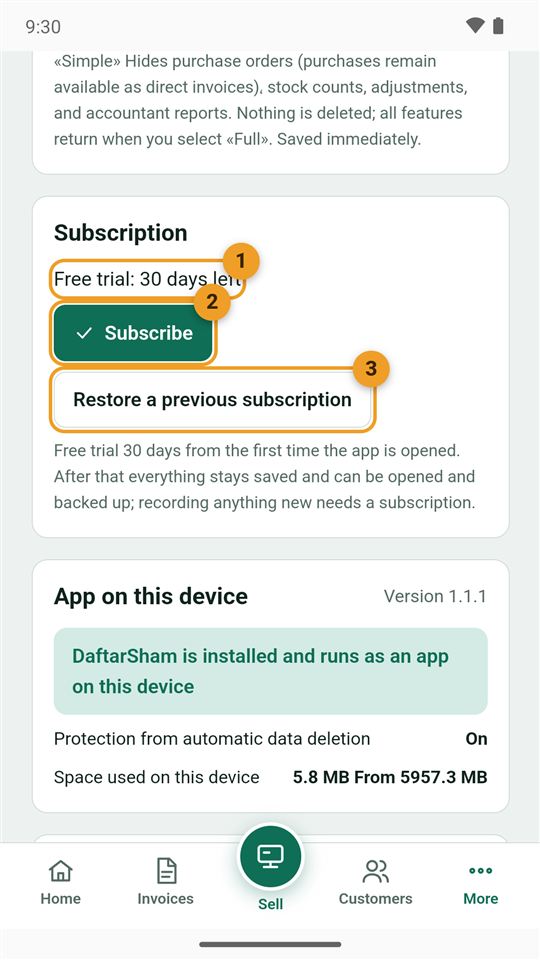
From More → Settings → Subscription:
- Status: the days left in the free trial, or "Subscribed".
- Subscribe: opens Google Play's payment window at the price in your currency.
- Restore a previous subscription: on a new phone or after reinstalling, with the same Google account you subscribed with.
2. Subscription questions
What happens if the trial ends and I don't subscribe?
Your book stays as it is: you can open it, search, print, share, back it up and restore it. Only new entries cannot be added until you subscribe. Nothing is deleted.
How do I cancel the subscription?
In the Google Play app: profile picture → Payments & subscriptions → Subscriptions → DaftarSham → Cancel subscription. It stays active until the end of the paid year.
Do I pay again on a new phone?
No. Install the app with the same Google account, then tap "Restore a previous subscription".