
How do you know your real profit?
Many shop owners and tradespeople count the money in the drawer at the end of the month and think it is their profit. But the money in the drawer can be much more or much less than the profit. Here is the difference, a simple way to work out your profit, and an example with figures.
Why the money in the cash box is not your profit
Because many things change what is in the cash box without changing the profit:
- Selling on credit: you sold and earned, but the money is still with the customer.
- Stock on the shelf: you paid for it, but it is not sold yet, so it is not a loss.
- What you owe a supplier: you took goods and have not paid, so not all the cash is yours.
- Personal drawings: what you take for your home lowers the cash, but it is not a business expense. See expenses versus personal drawings.
The simple formula
Profit = sales − cost of the goods you sold − expenses
- Sales: everything you sold in the period, for cash or on credit.
- Cost of goods sold: the purchase price of what you sold only, not of everything you bought.
- Expenses: what you spend on the business: rent, electricity, fuel, wages, repairs.
If your work is a service or labour (electrician, barber, driver), there are usually no goods, so the profit is simply sales minus expenses.
An example: one month in a small shop
| Item | Amount |
|---|---|
| Sales ($150 of them on credit) | $1,000 |
| Goods bought and paid for | $700 |
| Of which still on the shelf, unsold | $100 |
| Expenses (rent and electricity) | $150 |
| Taken home (personal drawing) | $100 |
Profit = 1,000 − 600 (cost of what was sold) − 150 = $250.
But the cash box = 850 cash in − 700 goods − 150 expenses − 100 drawing = $100 down.
He made $250 profit although the cash box went down. Where did it go? $150 is with customers, $100 is stock on the shelf, and he took $100 home: 250 − 150 − 100 − 100 = −100. Judging by the cash box alone, he would think he is losing.
How to see it in DaftarSham
Record every sale (even on credit), every expense, the purchase price of each item, and your personal drawings in their place. The app works out the rest:
- Open "More → Reports" and choose the period, such as "This month".
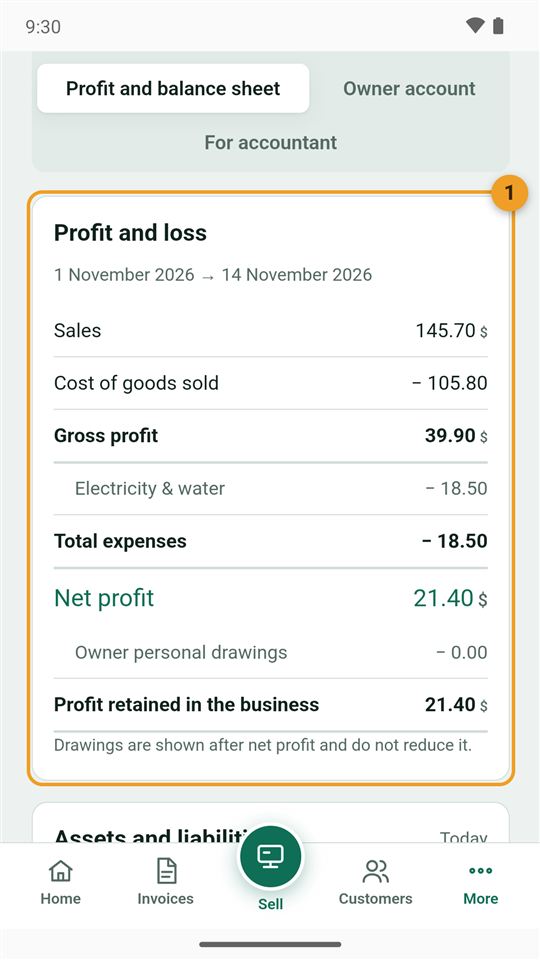
- Open "Profit and loss": sales, minus the cost of goods sold, minus expenses, equals net profit.
- The same tab has the balance sheet: what is in the cash box, in stock and with customers, and what you owe suppliers.
Full walk-through in Reports.
Three habits that keep the profit right
- Record a credit sale as a sale in the customer's name; do not wait until they pay.
- Enter the purchase price of every item, or the profit on goods looks bigger than it is.
- Keep household money apart from business money: record it as a personal drawing, not an expense.